

About
I was given a task: verify whether a generated media file is authentic, or whether it has been spoiled by AI, or by some other tool a scammer used to tamper with it.
So what are the possible and official ways to do this?
Two names kept coming back: C2PA and SynthID.
Instead of only reading about them, I actually ran them. I signed images, broke them on purpose, sent them through WhatsApp, edited them in Lightroom, pushed them through Gemini and ChatGPT, and watched what survives and what silently disappears.
What this post covers:
- What C2PA is and the problem it solves
- The three stages: signing, embedding, verification
- The three layers of verification: hash, signature, trust list
- Hands-on with the C2PA CLI tool and the C2PA Viewer
- Real-world C2PA apps: Click (capture) and Adobe Lightroom (edit)
- How LLMs treat existing content credentials
- Manifest v1 vs v2, and why Adobe fails on an LLM-signed image
- Deliberate tampering: one pixel, an edited public key, re-signing with an untrusted cert
- What SynthID is, how it’s encoded, and what it survives that C2PA does not
What C2PA is
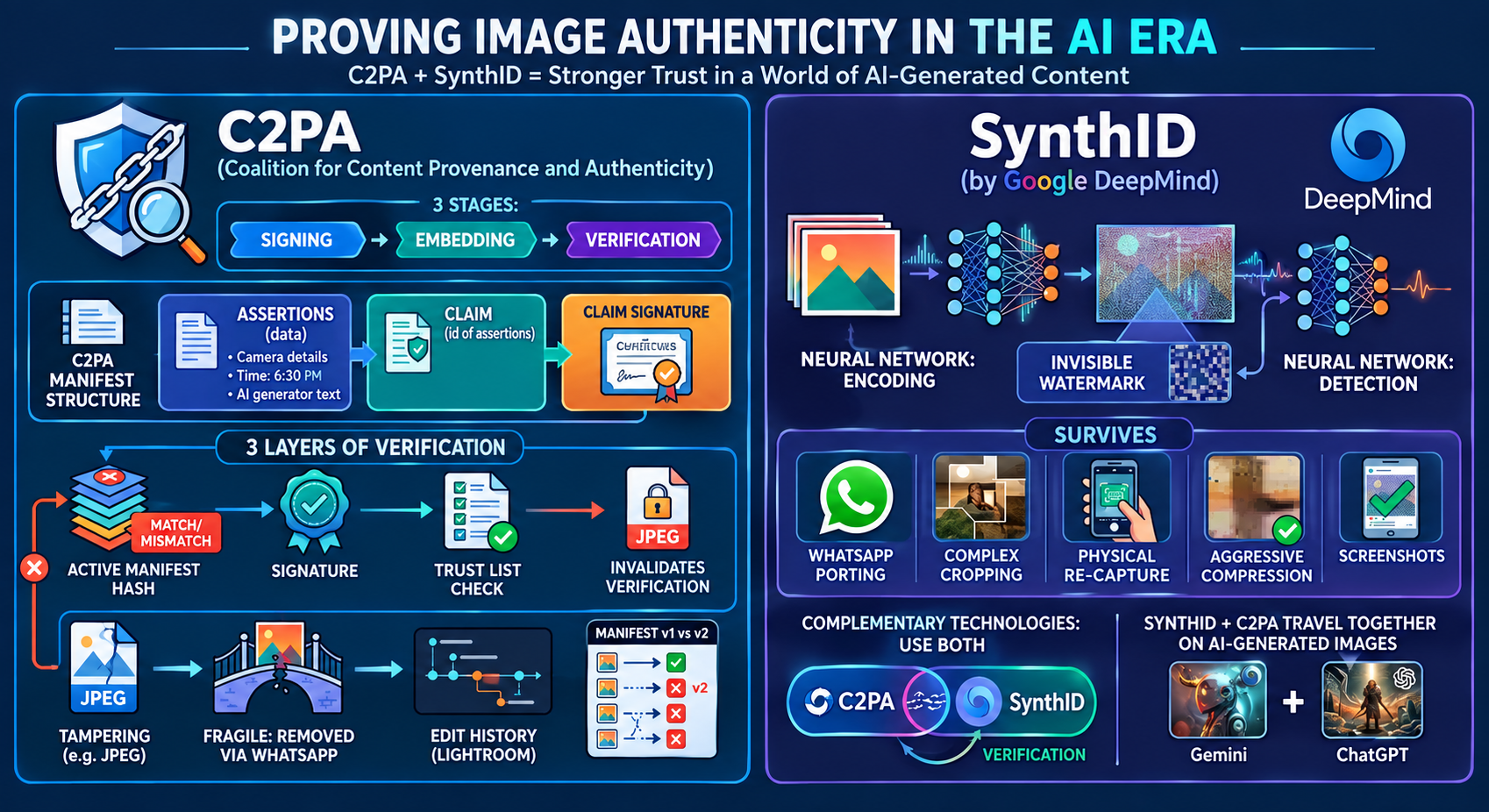
C2PA stands for the Coalition for Content Provenance and Authenticity. It’s an open technical standard for embedding cryptographically signed evidence of data inside digital media files.
A C2PA Manifest - an invisible watermark - travels inside the file and records who created the content, when, what tools were used, and every meaningful edit since capture. Tampering breaks the signature and is immediately detectable.
The problem it solves
In an era of generative AI, generated media are identical to authentic media at a visual level. Deepfake incidents tracked globally increased from 500,000 in 2023 to over 8 million in 2025.
Detection-only approaches are a losing battle, because generative models improve continuously. C2PA takes a different approach. Instead of detecting fakes after the fact, it focuses on proving authenticity at the point of creation. Content that carries valid C2PA credentials does not need to be detected as real - it cryptographically proves its origin.
How C2PA works: sign, embed, verify
The workflow has three stages.
- Signing. A camera, software or AI platform assembles assertions into a claim, and signs the claim with a private key.
- Embedding. The signed manifest is stored inside the file as JUMBF (JPEG Universal Metadata Box Format).
- Verification. Any C2PA-compliant tool reads the manifest and validates authenticity.
flowchart LR
    A[Assertions<br/>camera, time, tool, edits] --> B[Claim<br/>digest of all assertions]
    B -->|Private key| C[Claim signature]
    C --> D[Manifest embedded<br/>as JUMBF in the file]
    D --> E{Verification}
    E --> F[1 - Active manifest hash]
    E --> G[2 - Claim signature]
    E --> H[3 - Trust list check]
A manifest has three required components: one or more assertions (statements about the content), a single claim (a digest of all assertions), and a claim signature (a cryptographic signature over the claim using a trusted certificate).
The three layers of verification
This is the part that’s easy to get wrong, because tools tend to show you a single green tick. Verification is actually three independent checks, and a file can pass one and fail another.
| Layer | What it answers | What a failure means |
|---|---|---|
| Active manifest hash | Do the bytes of the file still match the hash recorded in the manifest? | The file has been modified since it was signed. |
| Claim signature | Is the signature over the claim cryptographically valid for the signer’s certificate? | The manifest itself has been altered, or it wasn’t signed by the key it claims. |
| Trust list check | Is the signer present in a recognised trust list? | The signature is mathematically valid, but it comes from a signer nobody vouches for. |
All three matter. A file can carry a perfectly valid signature from a signer nobody trusts, and if you only look at the hash you’ll call it authentic.
Trial 1: the C2PA CLI tool
To understand the workflow, I signed and verified a sample image using the C2PA CLI tool. That gave me the manifest structure - assertions, claim, claim signature - with claim version Schema v1, and all three layers of verification: active manifest hash, signature, and trust list check.
Trial 2: real applications
With the CLI tool I had a mental model of the C2PA workflow, its manifest structure and the layers of verification. Now it was time to walk around real-world applications and see how they had adopted C2PA.
I chose Click, a C2PA-compliant mobile app, to capture the image. After capturing, Click prompted me to “Swipe right to Sign” - and a cryptographically signed image was generated. Visually there is no change in the image, but underneath, the manifest - the C2PA recipe - is baked into it.
The signed image was now on my mobile, so the next questions were whether the image was really signed as per C2PA compliance, what happens to a C2PA-signed image once another app handles it. To verify it I first had to move it from mobile, and I used WhatsApp - the easiest way to share an image nowadays. Verifying the image that came out the other side with the C2PA CLI tool returned “no claim found”, and as a second check the C2PA Viewer - an online tool to examine and verify content credentials - also showed “This file doesn’t contain C2PA provenance information.”
I suspected the Click app - maybe it never really signed the image. To verify that, I sent the Click-signed image from my mobile again, this time over email as an uncompressed attachment, and ran both checks on it. The result: the C2PA CLI tool found the claim, and the C2PA Viewer displayed the content credentials Click had embedded. (Of the two, I prefer the C2PA Viewer, which is more user-friendly in terms of the visual aspect.)
So the signing was fine all along, and the culprit was WhatsApp, because it automatically re-encodes, compresses and optimises images during upload. This process silently strips out the embedded JUMBF metadata container where the C2PA content credentials live. Email passed the attached image file along untouched, so the manifest survived. When a non-C2PA-compliant app modifies the signed image, it strips off the content credentials.
Next, I took that emailed copy - the Click-signed image with its credentials still intact - and edited it in Adobe Lightroom, to check whether the manifest holds a trace of the changes made to it. As expected, the edit history and the respective party details also got stored, in addition to the previous content credentials.
What LLMs do to content credentials
One of the key questions of this study: how do LLMs handle content credentials?
While processing images with LLMs - whether signed, unsigned, or LLM-signed - the previous manifest vanishes and is replaced with the new edit history. Initially this was strange to us. Why are the previous details gone, unlike Adobe Lightroom?
We then found the manifest version difference. LLMs (Gemini and ChatGPT) are on v2, others (Click and Adobe) on v1. So we tried with another image already carrying a v2 manifest, but even for the same version the LLM showed similar behaviour.
As per our understanding, the final decision is up to third parties. They decide whether they want to carry the previous edit history forward, or rewrite the manifest with only the current active changes.
Manifest v1 vs v2, and why Adobe fails
With Adobe, processing an LLM-signed image failed during export if the content credentials toggle was turned on.
Behind the scenes it’s a “reader behind writer” problem. Adobe is on Schema v1 but the LLMs are on v2, and due to the issue in parsing a v2 manifest, Adobe failed. The same way, a lower-versioned C2PA CLI tool also throws an error while reading a higher-versioned manifest.
Breaking it on purpose
To exercise all three layers of verification, we ran tampering tests.
| Tampering | Result |
|---|---|
| Tampered the image by only one pixel | Hash not matching, i.e. file tampered. |
| Edited the public key in the already-signed manifest | Same result. |
| Re-signed the untampered image with a new private key and certificate | New signer details updated in the manifest, with a warning that the signer is not in the trust list. |
The third case is the interesting one. Nothing about the image is wrong. The hash matches, the signature is valid. It’s the trust list, and only the trust list, that catches it.
SynthID
What it is
SynthID is a watermarking technique built by Google DeepMind. It invisibly marks AI-generated content - images, audio, video and text - so the content can later be identified as AI-made, even after it has been edited, cropped, recompressed or shared around the internet. Unlike metadata-based approaches like C2PA, SynthID operates at the pixel level.
The problem it solves
Just as with C2PA, the goal is to flag AI-generated media apart from authentic content. Perfect AI detection is impossible, but embedding a durable provenance signal during generation builds a technique to resist and identify basic tampering.
Unlike C2PA metadata, which is easy to strip, that is not applicable here. Invisible watermarks travel with the content and survive basic tampering, and they are superior to visible watermarks that ruin the content.
How it’s encoded
Through a dual-network approach: embedding and detection.
- The embedder. A neural network injects a distributed watermark into pixel values. Not a visible watermark, but a subtle pattern encoded across the image.
- The detector. A paired model reads the watermark signal from the image. Because the watermark is holographically distributed, even cropped fragments can retain detectable information.
Trials and outcomes
Images generated from Gemini and ChatGPT contain both C2PA and SynthID. We already know C2PA is stripped off on a screenshot, or when the image is shared through non-C2PA-compliant apps. SynthID travelled with the image through:
- sharing through non-C2PA-compliant apps
- screenshots
- cropping the image
- capturing the desktop image with my mobile camera
- compressing the image quality to nearly 60%
In all of the above scenarios, SynthID stays with the generated image.
My takeaway
C2PA and SynthID are not competitors. They fail in opposite directions.
C2PA gives you cryptographic proof - who, when, which tool, every edit - but it is fragile. One trip through WhatsApp and it’s gone.
SynthID gives you durability. It survives screenshots, crops and compression, but it only tells you “AI-generated”, not the full provenance story.
For a real verification pipeline, you need both. And you need to check all three C2PA layers - hash, signature and trust list - because a file can have a perfectly valid signature from a signer nobody trusts.
Official standard: c2pa.org • C2PA Viewer: c2paviewer.com